Choose an Azure Compute Service
Azure provides many ways to host your application code. The term compute refers to the hosting model for the resources that your application runs on. This guide helps you choose a compute service for your application.
Decision Tree
Use the following flowchart to select a candidate compute service:
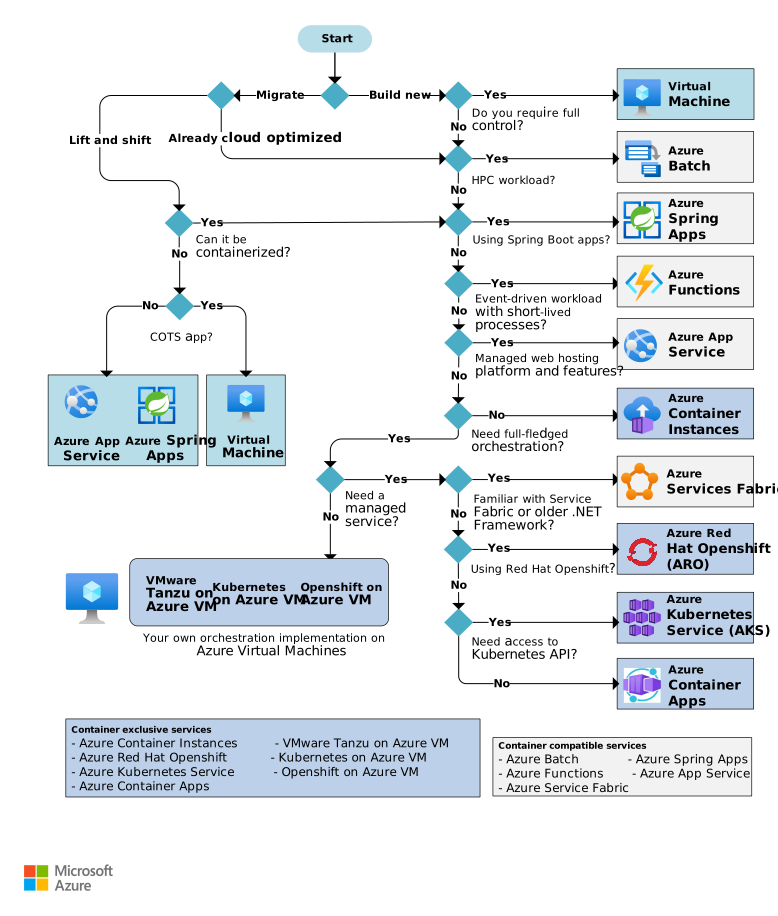
Migration vs. New Build
Migration Path:
- Lift and shift: Migrate without redesigning the application or making code changes (also known as rehosting)
- → Azure App Service (if cloud-optimized)
- → Azure VMware Solution (if VMware workload)
- → Virtual Machines (if cannot be lifted and shifted)
- Cloud optimized: Refactor to take advantage of cloud-native features
- → Azure App Service
- → Azure Container Apps
- → Azure Kubernetes Service (AKS)
Build New Path:
- Need full control? → Virtual Machines
- High-performance computing (HPC)? → Azure Batch
- Event-driven workloads? → Azure Functions
- Managed web hosting? → Azure App Service
- Need orchestration?
- → Azure Container Instances (simple)
- → Azure Service Fabric (distributed systems)
- → Azure Red Hat OpenShift (OpenShift)
- → Azure Kubernetes Service (AKS) (Kubernetes)
- → Azure Container Apps (serverless containers)
Understanding Hosting Models
Cloud services fall into three categories:
Infrastructure as a Service (IaaS)
- Provision VMs along with networking and storage components
- Deploy any software and applications on those VMs
- Closest to traditional on-premises environment
- Microsoft manages infrastructure, you manage VMs
- Example: Azure Virtual Machines
Platform as a Service (PaaS)
- Managed hosting environment
- Deploy applications without managing VMs or networking resources
- Examples: Azure App Service, Azure Container Apps
Functions as a Service (FaaS)
- Deploy code to the service, which automatically runs it
- Example: Azure Functions (serverless compute)
Trade-off: IaaS provides the most control and flexibility but requires more management. FaaS automatically manages nearly all aspects. PaaS provides partial management with some user configuration.
Service Comparison
Basic Features
| Service | Application Composition | Density | Minimum Nodes | State Management | Web Hosting |
|---|---|---|---|---|---|
| Virtual Machines | Agnostic | Agnostic | 1 2 | Stateless or stateful | Agnostic |
| App Service | Applications, containers | Multiple apps per instance | 1 | Stateless | Built-in |
| Azure Functions | Functions, containers | Serverless 1 | Serverless 1 | Stateless or stateful 6 | Not applicable |
| AKS | Containers | Multiple containers per node | 3 3 | Stateless or stateful | Agnostic |
| Container Apps | Containers | Serverless | Serverless | Stateless or stateful | Agnostic |
| Container Instances | Containers | No dedicated instances | No dedicated nodes | Stateless | Agnostic |
| Azure Red Hat OpenShift | Containers | Multiple containers per node | 6 5 | Stateless or stateful | Agnostic |
| Service Fabric | Services, guest executables, containers | Multiple services per VM | 5 3 | Stateless or stateful | Agnostic |
| Batch | Scheduled jobs | Multiple apps per VM | 1 4 | Stateless | No |
| Azure VMware Solution | Agnostic | Agnostic | 3 7 | Stateless or stateful | Agnostic |
Notes:
- Azure Functions Consumption plan is serverless. App Service plan runs on allocated VMs.
- Higher SLA with two or more instances.
- Recommended for production environments.
- Can scale down to zero after job completes.
- Three primary nodes and three worker nodes.
- When using durable functions.
- See Hosts documentation.
Networking
| Service | Virtual Network Integration | Hybrid Connectivity |
|---|---|---|
| Virtual Machines | Supported | Supported |
| App Service | Supported 1 | Supported 2 |
| Azure Functions | Supported 1 | Supported 3 |
| AKS | Supported | Supported |
| Container Apps | Supported | Supported |
| Container Instances | Supported | Supported |
| Azure Red Hat OpenShift | Supported | Supported |
| Service Fabric | Supported | Supported |
| Batch | Supported | Supported |
| Azure VMware Solution | Supported | Supported |
Notes:
- Requires App Service plan or Premium plan.
- Via VNet integration or App Service Environment.
- Via VNet integration (Premium plan).
Development and Deployment
| Service | Local Development | Deployment Options | Update Strategy |
|---|---|---|---|
| Virtual Machines | Any | Custom | Manual or automated |
| App Service | Visual Studio, VS Code, others | Git, CI/CD, Azure CLI, Portal | Rolling update |
| Azure Functions | Visual Studio, VS Code, others | Git, CI/CD, Azure CLI, Portal | Rolling update |
| AKS | Minikube, Docker, others | kubectl, Helm, CI/CD | Rolling update |
| Container Apps | Docker Desktop, others | Azure CLI, CI/CD | Rolling update |
| Container Instances | Docker Desktop | Azure CLI, Portal | Replace container |
| Azure Red Hat OpenShift | Minikube, Docker, others | Agnostic | Rolling update |
| Service Fabric | Local node cluster | Guest executable, Service model, Actor model, containers | Rolling upgrade per service |
| Batch | Not supported | Command-line application | Not applicable |
| Azure VMware Solution | Agnostic | Agnostic | No built-in support |
Scalability
| Service | Autoscaling | Load Balancer | Scale Limit 3 |
|---|---|---|---|
| Virtual Machines | Virtual machine scale sets | Azure Load Balancer | Platform: 1,000 nodes/scale set; Custom: 600 nodes/scale set |
| App Service | Built-in service | Integrated | 30 instances (100 with ASE) |
| Azure Functions | Built-in service | Integrated | 200 instances per function app |
| AKS | Pod autoscaling 1, cluster autoscaling 2 | Load Balancer or Application Gateway | 5,000 nodes (with uptime SLA) |
| Container Apps | Scaling rules 4 | Integrated | 15 environments/region (default), unlimited apps |
| Container Instances | Not supported | No built-in support | 100 container groups/subscription (default) |
| Azure Red Hat OpenShift | Pod autoscaling, cluster autoscaling | Load Balancer or Application Gateway | 250 nodes/cluster (default) |
| Service Fabric | Virtual machine scale sets | Load Balancer | 100 nodes/scale set |
| Batch | Not applicable | Load Balancer | 900 dedicated + 100 low-priority cores (default) |
| Azure VMware Solution | Built-in service 5 | Integrated 6 | 3-16 VMware ESXi hosts per vCenter |
Notes:
- See Autoscale pods.
- See Automatically scale a cluster.
- See Azure subscription and service limits.
- See Set scaling rules in Container Apps.
- See Scale Azure VMware Solution.
- See VMware NSX.
Availability
| Service | Multiregion Failover Option |
|---|---|
| Virtual Machines | Azure Traffic Manager, Azure Front Door, cross-region Load Balancer |
| App Service | Traffic Manager, Azure Front Door |
| Azure Functions | Traffic Manager, Azure Front Door |
| AKS | Traffic Manager, Azure Front Door, Multiregion Cluster |
| Container Apps | Traffic Manager, Azure Front Door |
| Container Instances | Traffic Manager, Azure Front Door |
| Azure Red Hat OpenShift | Traffic Manager, Azure Front Door |
| Service Fabric | Traffic Manager, Azure Front Door, cross-region Load Balancer |
| Batch | Not applicable |
| Azure VMware Solution | Not applicable |
Other Criteria
| Service | TLS | Cost | Suitable Architecture Styles |
|---|---|---|---|
| Virtual Machines | Configured in VM | Windows, Linux | N-tier, Big compute (HPC) |
| App Service | Supported | App Service pricing | Web-queue-worker |
| Azure Functions | Supported | Azure Functions pricing | Microservices, Event-driven |
| AKS | Ingress controller | AKS pricing | Microservices, Event-driven |
| Container Apps | Ingress controller | Container Apps pricing | Microservices, Event-driven |
| Container Instances | Sidecar container | Container Instances pricing | Microservices, task automation, batch jobs |
| Azure Red Hat OpenShift | Supported | Azure Red Hat OpenShift pricing | Microservices, Event-driven |
| Service Fabric | Supported | Service Fabric pricing | Microservices, Event-driven |
| Batch | Supported | Batch pricing | Big compute (HPC) |
| Azure VMware Solution | Configured in VM | Azure VMware Solution pricing | VM workload based on VMware format |
Service Overviews
Azure App Service
Managed service for hosting web apps, mobile app back ends, RESTful APIs, or automated business processes.
Azure Batch
Managed service for running large-scale parallel and high-performance computing (HPC) applications.
Azure Container Apps
Managed service built on Kubernetes that simplifies deployment of containerized applications in a serverless environment.
Azure Container Instances
Service for running a single container or group of containers in Azure. Doesn't provide full container orchestration but allows containers without provisioning VMs.
Azure Functions
Service that provides managed functions running based on various trigger types for event-driven applications.
Azure Kubernetes Service (AKS)
Managed Kubernetes service for running containerized applications.
Azure Red Hat OpenShift
Fully managed OpenShift cluster for running containers in production with Kubernetes.
Azure Service Fabric
Distributed systems platform that can run in many environments, including Azure or on-premises.
Azure VMware Solution
Managed service for running VMware workloads natively on Azure.
Azure Virtual Machines
Service where you deploy and manage VMs inside an Azure virtual network.
Evaluation Criteria
When evaluating a candidate service, consider:
- Cost - Review pricing models and calculate total cost of ownership
- Regional availability - Ensure service is available in your required regions
- Service limits - Check quotas and constraints for your workload
- SLAs - Understand service-level agreements and guarantees
Multi-Workload Applications
If your application consists of multiple workloads, evaluate each workload separately. A complete solution can incorporate two or more compute services.